 Notes: Beginner Supplies: Psp5127-SCZone-TheLightFairy DBS Flux Silver Gradient Preparation: Open your tube and Duplicate, close the original, Resize to 300 on the longest side Foreground: #BAB6BA Background: White Make this into a gradient - Skip if you have a silver gradient already Angle: 130 Repeats: 3 Style: Linear Font: Your choice Step 1: Take your tube Step 2: Image/Add Borders/40 px/Blue
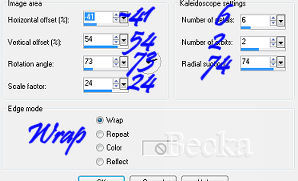
Highlight this border Flood Fill with your gradient Effects/Reflection Effects/Kaleidoscope
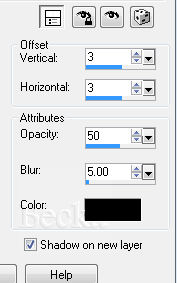
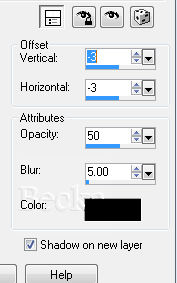
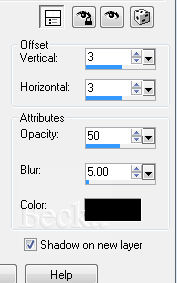
Effects/3D Effects/Drop Shadow
Step 3: Selections/Selections All
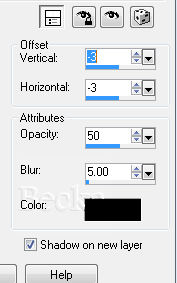
Effects/3D Effects/Drop Shadow Step 4: Selections/Selections All
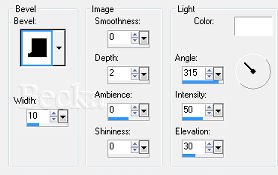
Selections/Modify/Contract 40 Selections/Invert Effects/plugins/DSB Flux/Spider Web Rays: 10 Rings: 10 Merge: 95 Deselect Layers/Merge/Merge Visible (if needed) Step 5: Add Borders use Blue/10px
Highlight your border Flood fill this with your gradient Use the same 2 Drop Shadows as before Use the same Inner Bevel as before Layers/Merge/Merge Visible (if needed) Selections/Select None Step 6: Click on your text tool
Foreground: Black Add Caption
Options/Align/Horizontal Center in Canvas Effects/3D Effects/Drop Shadow - Your choice Effects/3D Effects/Inner Bevel - Your choice Layers/New Raster Layer Add Watermark Add name - Same Drop Shadow as the Caption Layers/Merge/Merge All
Voila!! ©CreateWithBecka
|
|









Make a Free Website with Yola.
