Notes:
This tut was done in PSP 10 but should work as well in other versions.
Some knowledge of, and experience with, PSP is required.
A trial version of PSP can be downloaded from here.
You are welcome to use my images, or use your own
If any filters are used, please note that if you don't already have them installed that you will have to close PSP, Install, then start PSP again.
Beginner
Supplies:
Tube or text of your choice, or both
Preparation:
Take your tube or text of your choice or both
Edit/Copy
Edit/Paste as a new Image
Step 1:
Once you have your choice of text or tube
Image/Greyscale
File/Export/Custom Brush
Name your brush
Click on 'Edit Paths' if you want your brush to go somewhere other than the default PSP folder
Close PSP
Then re-open PSP
Click on the 'Paint Brush' tool
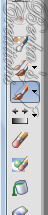
Look for your brush
Transparent Layer
Click on the 'Paint Tool' again
Click on the transparent image
Now its there for you to use :-)
Voila!!
©CreateWithBecka
2009-2011
11-20-10