 Notes: Intermediate Supplies: Iam_Giving_up_control
Open the tube Duplicate and close the original.
Or use of your own. Delete the watermark Pick 2 colors from your image Step 1: We are going to work with our Tube
Layers/New Raster Layer Layers/Arrange/Send to Bottom Pick a color from your image, I choose #6d1720 Flood fill this layer Layers/Merge/Merge Visible Step 2: Image/Add Borders 1 px White
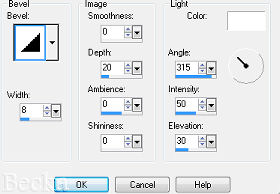
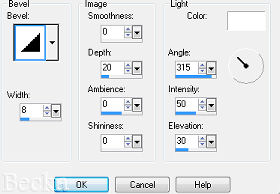
Repeat Outer Bevel Except change the Angle to 144
Deselect Step 3: Activate your Text tool
Add a caption Using your 2 colors
Objects/Align/Horizontal Center in Canvas - If you want
Highlight your raster 1 layer
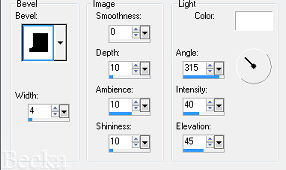
Effects/3D Effects/Inner Bevel
Layers/Merge/Merge Visible Step 4: Image/Add Borders/30 px/1 of your colors
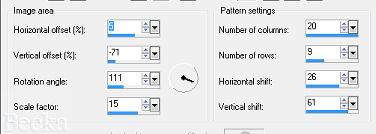
Highlight this border Effects/Reflection Effects/Pattern
Effects/3D Effects/Outer Bevel
Repeat Outer Bevel - Change Angle to: 144
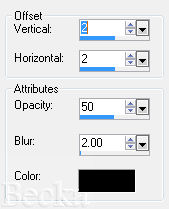
Selections/Selections None Image/Add Borders 1 px White Re-size to 400 on the longest side Layers/New Raster Layer Add your watermark Add your name Add Drop Shadow/same as above Add Inner Bevel/same as before Layers/Merge/Merge Flatten
Voila!!   |
|












Make a Free Website with Yola.
