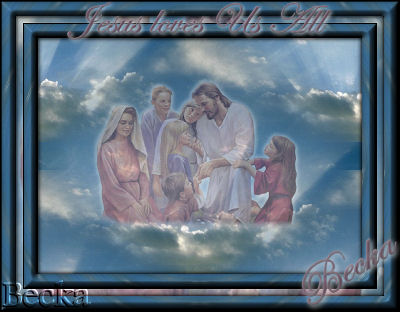
 Notes: If any filters are used, please note that if you don't already have them installed that you will have to close PSP, Install, then start PSP again. Advanced Supplies: GG08~Jesus Children_002
25669 - Background Eye Candy 3
Own tube/Graphic/Image: Make sure your tube is: Background: 500 x 370
Preparation: Edit/Copy your Background
Image/Re-size to 62% Duplicate Close the original Edit/Copy your GG08 Image Re-size to 75% Duplicate Close the original Pick 2 colors Step 1: Take your background image
Lower the opacity to 50%
Step 2: Selections/Select All
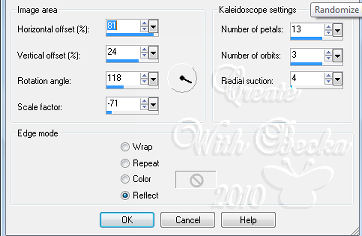
Selections/Modify/Contract/20 px Selections/Invert Make sure that your Raster Layer1 is highlighted Effects/Reflection Effects/Kaleidoscope
Effects/Image Effects/Seamless Tiling/Default
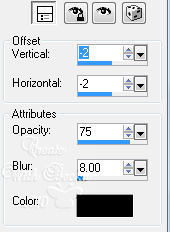
Effects/3D Effects/Drop Shadow
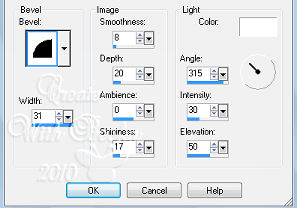
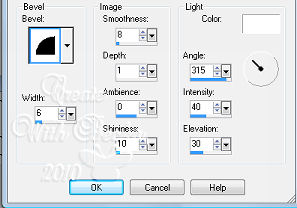
Step 3: Effects/Plugins/Eye Candy 3/Antimatter/2x
Edit/Copy
Edit/Paste as a New Image - This is your frame Minimize Selections/Select None Image/Add Borders/1 px/Black Step 4: Selections/Select All
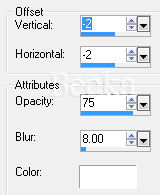
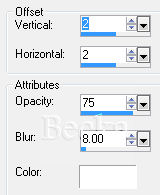
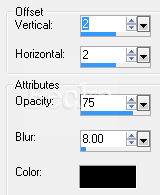
Selections/Modify/Contract/100 Edit/Copy Edit/Paste as a New Image - this is your pattern Selections/Select None Image/Add Borders/10 px/White Highlight this border Edit/Paste Into Selection your pattern Selections/Select None Image/Add Borders/20 px/White Take your frame Edit/Copy Highlight this border Edit/Paste Into Selection Add the 2 Drop shadows Selections/Select None Image/Add Borders/1 px/Black Step 5: Add a Caption
Effects/3D Effects/Drop Shadow
Image/Add Borders/1px/Black Re-size to 400 px on the longest side Add your name - follow the same steps as your 'caption' Layers/New Raster Layers Add watermark Voila!! ®©Create With Becka   |
|

Make a Free Website with Yola.
