Notes:
This tut was done in PSP 10 but should work as well in other versions.
Some knowledge of, and experience with, PSP is required.
A trial version of PSP can be downloaded from here.
You are welcome to use my images, or use your own
If any filters are used, please note that if you don't already have them installed that you will have to close PSP, Install, then start PSP again.
Intermediate
Supplies:
COUPLE-KISSING-PJW-15081
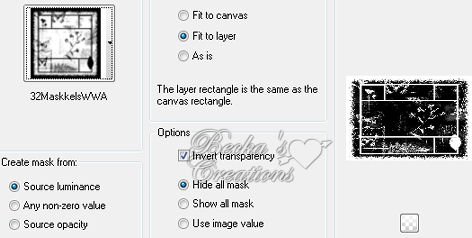
32maskkelWWA
40-Kris
Preparation:
Open a 600 x 400 transparent Image
Pick a dark color and make the other color white
Place both masks in your Mask Folder
Step 1:
BackgroundFlood fill your 600 x 400 image with your dark color
Layers/New Raster Layer
Flood Fill with White
Step 2
MaskLayers/Load-Save Mask/Load Mask From Disk/

Layers/Merge/Merge Group
Layers/Merge/Merge Visible
Step 3:
Couple
Edit/Copy
Edit/Paste as a new layer
Place the elbow of the woman on the bottom line

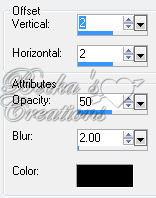
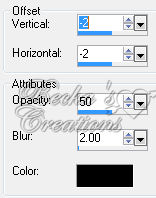
Effects/3D Effects/Drop Shadow


Step 3:
Background Again
Highlight your merged layer
Layers/New Raster Layer
Flood fill with White
Layers/Load-Save Mask/Load Mask From Disk/
Layers/Merge/Merge Group
Layers/Merge/Merge Visible
Step 4:
Image/Add Borders/1 px/Your dark Color
Add a caption
Add your name
Effects/3D Effects/Drop Shadow - on Name & Caption
Layers/New Raster Layer
Add Watermark
Layers/Merge/Merge Visible
®©Create With Becka
2009-2011
6-19-10