 Notes: Intermediate Supplies: CLOUDS01
Joni_ANGEL 3-14-07_JONI Filters Unlimited
Backgroundmaniac
Background
Edit/Copy Edit/Paste as a new Image Close the original Angel Edit/Copy Edit/Paste as a new Image Close the original Pick 2 colors from your image
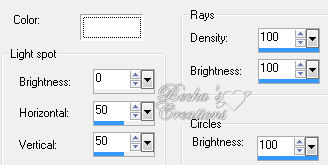
Step 1: Sunburst
Edit/Copy Effects/Illumination Effects/Sunburst
Step 2: Background
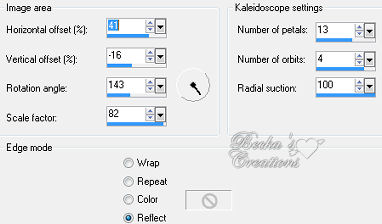
Image/Add borders/1 px/Black Image/Add borders/15 px/White Highlight this border Edit/Paste Into Selection Effects/Reflection Effects/Kaleidoscope
Layers/New Raster Layer
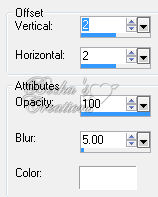
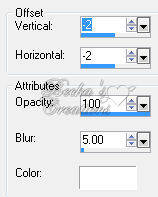
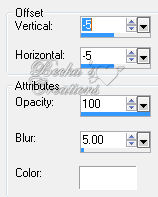
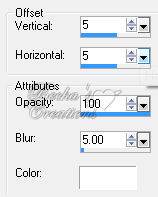
Flood Fill with White Lower the opacity to 20% Layers/Merge/Merge Visible Effects/Plugins/Filters Unlimited/Distortion Filters/Warp Jump/200 Effects/Plugins/Backgroundmaniac/Native Illusions/Default Effects/3D Effects/Drop Shadow
Image/Add Borders/1 px/Black
Selections/Select None Step 3: Angel
Step 4: Add Name
Add a caption Layers/New Raster Layer Add Watermark Layers/Merge/Merge Visible ®©Create With Becka 6-21-10   |
|

Make a Free Website with Yola.
