 This tut was done in PSP 10 but should work as well in other versions.
Some knowledge of, and experience with, PSP is required. A trial version of PSP can be downloaded from here. You are welcome to use my images, or use your own If any filters are used, please note that if you don't already have them installed that you will have to close PSP, Install, then start PSP again. Beginner Supplies:
DADDY-AND-ME-PJW-22161960
Xero
Preparation: Open a 500 x 500 Transparent Image
Take your DADDY Tube and resize to: 60% (210 x 210) Step 1:
Take your 350 x 350 image
Selections/Select All
Edit/Copy (DADDY)
Edit/Paste Into Selection
Selections/Select None
Layers/New Raster Layer
Layers/Arrange/Send to Bottom
Flood fill with White
Layers/Merge/Merge Visible
Effects/Image Effects/Seamless Tiling/Default
Effects/Distortion/Twirl/-720
Effects/Image Effects/Seamless Tiling/Default
Effects/Reflection Effects/Kaleidoscope  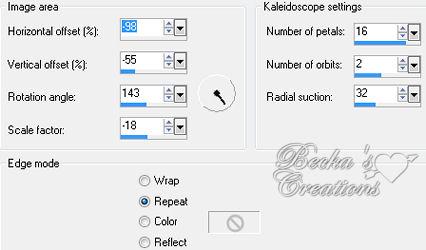 Effects/Image Effects/Seamless Tiling/Default
Layers/New Raster Layer
Flood fill with White
Lower the opacity to 50
Layers/Merge/Merge Visible
Edit/Paste as a New Layer
Image/Mirror
Move your image to where you like it
Add a Caption
Effects/3D Effects/Drop Shadow - You choice
Layers/New Raster Layer
Add Watermark
Layers/Merge/Merge Visible
Voila
®©Create With Becka
2009-2011 6-13-10   |
|

Make a Free Website with Yola.
