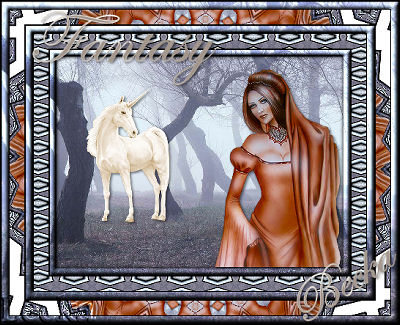
 Notes: Intermediate Supplies: Forest 16_1
Unicorn-big-ch Fair Maiden-Bastet_LR-08-07-09 Your choice as well as the settings Backgroundmaniac Preparation: Take the background
Re-size to: 40% Duplicate 2x Minimize 1 of them Close original Take the woman Re-size to: 50% Duplicate Close original Take the Unicorn Re-size to: 40% Duplicate Close original Pick 2 colors from your image Step 1: Take the background
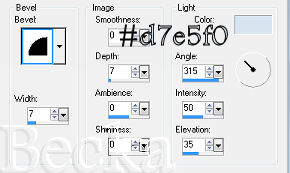
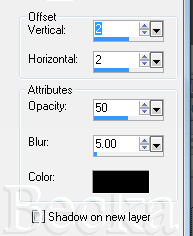
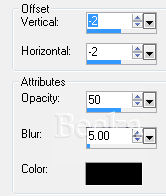
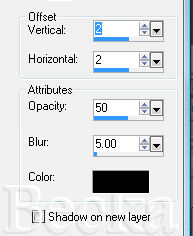
Effects/3D Effects/Drop Shadow
Selections/Select All
Selections/Modify/Contract/11 px Selections/Invert Edit/Copy Edit/Paste as a New Image - This is your frame Minimize Deselect Step 2: Edit/Copy your woman
Take your unicorn and Edit/Copy
Edit/Paste as a New Layer Place in the open area where you think it looks best Effects/3D Effects/Drop Shadow/Same as above
Step 3: Image/Add Borders/1 px/Black
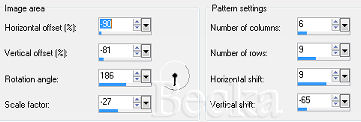
Image/Add Borders/20 px/White Highlight this border Take your duplicated background Edit/Copy Edit/Paste Into Selection Effects/Plugins/Simple/4 Way Average Effects/Plugins/Backgroundmaniac/Native Illusions/Default Effects/Reflection Effects/Pattern
Deselect
Step 4: Image/Add Borders/1 px/Black
Image/Add Borders/11 px/White Highlight this border Edit/Copy your image of the frame Edit/Paste Into Selection Deselect Step 5: Image/Add Borders/1 px/Black
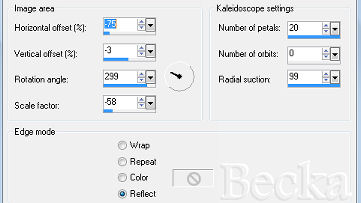
Image/Add Borders/20 px/White Highlight this white border Effects/Reflection Effects/Kaleidoscope
Selections/Select None
Image/Add Borders/1 px/Black Image/Add Borders/11 px/White Take your frame again, Edit/Copy Highlight this border Edit/Paste Into Selection Selections/Select None Image/Add Borders/1 px/Black Step 6: Layers/New Raster Layer
Add your watermark Add Name Add a caption Layers/Merge/Merge Visible Re-size to 400 on the longest side
Voila!! ®©Create With Becka 4-11-10   |
|

Make a Free Website with Yola.
