 Notes: Supplies: Fairy001_cmh
Eye Candy 3.1 Font - Your choice Preparation: Take your tube, duplicate and close the original
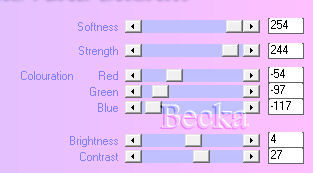
Pick 2 colors from your tube Step 1: Working with your tube Effects/Plugins/Xero/Bad Dream, settings are:
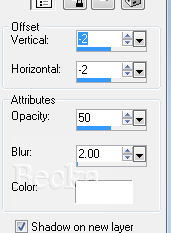
 Effects/3D Effects/Drop Shadow
Repeat - change the Vertical/Horizontal to: 2
Layers/New Raster layer Layers/Arrange/Send to Bottom Flood fill with one of your colors, or a gradient from the colors that you choose Layer/Merge/Merge Visible Step 2: Image/Add Borders/2 px/Black
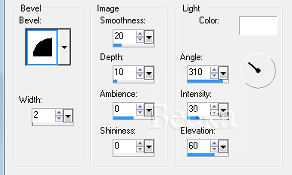
Selection Tool - rectangle - and select a portion of your tube Edit/Copy Selections/Select None Image/Add Borders - 10 px White Highlight this border Edit/Paste INTO Selection Effects/3D Effects/Inner Bevel
Effects/Plugins/Eye Candy 3.1/Glow
Width: 20 Opacity: 100 Opacity Dropoff: Fat Color: White Selections/Select None Step 3: Image/Add Borders/2 px/Black ®©CreateWithBecka 8-24-09   |
|

Make a Free Website with Yola.
